How I Got 150+ Stars on GitHub for a Next.js Portfolio Template
The story behind minimal-next-portfolio — an open-source Next.js 16 portfolio template that grew from a personal project to 148 stars, 41 forks, and developers worldwide using it to showcase their work.
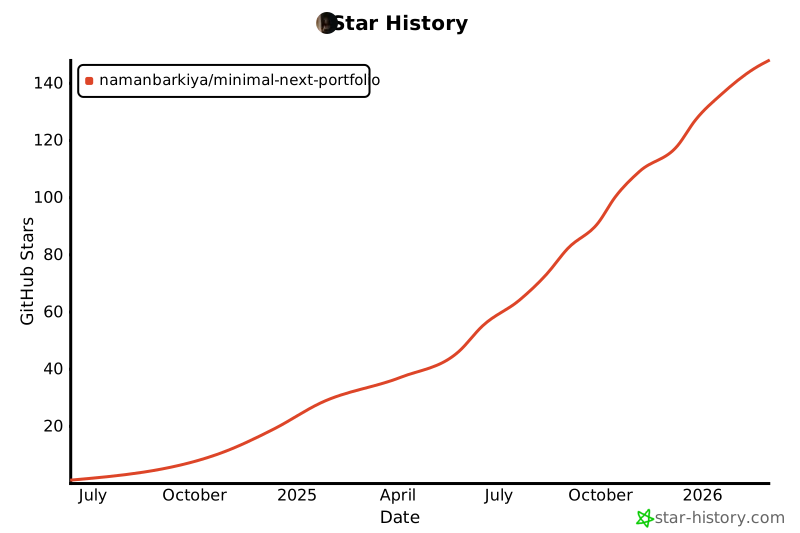
In early 2024 I needed a portfolio. I looked at dozens of templates and none of them felt right — either they were over-engineered React apps that took hours to customize, or they were bare CSS sites with zero interactivity. So I built my own, open-sourced it, and today it sits at 148+ stars and 41 forks on GitHub.
Here's the story of what I built, what decisions mattered, and what I learned about building open-source projects that developers actually want to use.
Repo: github.com/namanbarkiya/minimal-next-portfolio · Live: nbarkiya.xyz
The Core Idea: Object-Driven Architecture
Most portfolio templates require you to edit JSX or dig into components to add your information. That's the wrong abstraction. Your portfolio data — projects, experience, skills — is content, not code.
I designed the entire template around configuration objects. You fill in TypeScript config files and everything renders automatically:
// config/projects.ts — this is all you edit
export const featuredProjects: ProjectConfig[] = [
  {
    id: "convot",
    title: "Convot - AI Chatbot Platform",
    description: "Embeddable RAG chatbot for businesses",
    techStack: ["nextjs", "typescript", "fastapi"],
    links: {
      live: "https://convot.ai",
      github: "https://github.com/namanbarkiya/convot",
    },
  },
  // ... add more, remove some — that's it
];
No JSX to touch. No components to modify. This single decision is what made the template genuinely easy to adopt, and I believe it's the #1 reason developers star and fork it.
The Tech Stack That Works
| Layer | Choice | Why |
|---|---|---|
| Framework | Next.js 16 + App Router | SSR, ISR, route groups, metadata API |
| Language | TypeScript (strict) | Config objects need type safety |
| Styling | Tailwind CSS + shadcn/ui | Rapid iteration, consistent design tokens |
| Animations | Framer Motion | Smooth page transitions, scroll reveals |
| Themes | next-themes + CSS variables | 7 themes with zero JS overhead |
| Analytics | Vercel Analytics + GA | No-config observability |
| Deployment | Vercel | git push → live in 30 seconds |
7 Built-In Themes
One feature that consistently surprised people: the template ships with 7 fully designed themes — Dark, Light, Retro, Cyberpunk, Aurora, Synthwave, and Paper. They all use CSS custom properties, so adding your own is trivial:
.cyberpunk {
  --background: 240 10% 4%;
  --foreground: 60 5% 90%;
  --primary: 180 100% 50%;
  /* ... all tokens defined */
}
Users switch themes with a single dropdown — no page reload, no flash.
What Made It Grow
1. Lighthouse 100 Out of the Box
I was obsessive about this. Every image uses next/image with proper width, height, and priority attributes. Fonts use next/font with preloading. CSS is utility-first with no unused styles. The result: a perfect 100/100 Lighthouse score on every page.
This matters because developers evaluating templates often run a Lighthouse audit before they look at the code. A perfect score is an instant trust signal.
2. SEO Done Right
Every page has:
- Structured JSON-LD data (
Person,WebSite,SoftwareApplication) - Proper canonical URLs
- Dynamic
sitemap.xmlandrobots.txt - Open Graph and Twitter Card meta tags with images
Several users told me they ranked on Google within weeks of deploying — directly attributable to the built-in SEO.
3. Genuine Features, Not Filler
The template includes things developers actually need:
- Professional Experience Timeline — animated, expandable, links to company pages
- Project Showcase — tech stack badges, live demo + GitHub links, detailed descriptions
- Skills Grid — categorized by domain with visual proficiency indicators
- Contact Form — functional, with validation and server action handling
- GitHub Contributions — real-time star counts and contribution data
4. A Good README
I treated the README as a product page. Screenshot at the top, feature list, one-command setup, clear customization guide, star history chart. A good README is AEO (Answer Engine Optimization) by default — AI search engines index GitHub READMEs aggressively.
The Growth Pattern
The star graph wasn't a hockey stick. It was:
- Week 1: 0 stars. Shared on X, got 3 likes.
- Month 1: ~15 stars. A few Reddit posts in r/reactjs and r/webdev gained modest traction.
- Month 3: ~50 stars. GitHub's "Trending" algorithm surfaced it once. That single day brought 20+ stars.
- Month 6: ~100 stars. Word-of-mouth from developers who had deployed it and linked back.
- Now: 148 stars, 41 forks. Consistent 2-3 stars/week from organic GitHub search.
The biggest lesson: consistency beats virality. There was no single moment that made it blow up. It grew because it's genuinely useful, well-documented, and easy to deploy.
Key Takeaways for Open Source
- Config-driven architecture lowers the adoption barrier more than any amount of documentation.
- Lighthouse 100 is a trust signal that compounds — it tells developers the author cares about craft.
- 7 themes made it shareable — people screenshot different themes and share them.
- The README is your landing page. Invest real time in it.
- Ship, iterate, respond to issues. Half the forks came from developers who opened an issue, got a response, and then starred.
If you're building something similar — whether a template, a CLI tool, or a library — focus on making the first 5 minutes effortless. Clone → install → see your data rendered beautifully. That's the moat.
Try it yourself: github.com/namanbarkiya/minimal-next-portfolio